E-Challan Paid But Status Not Updated? The Guaranteed Fix
چالان ادا کرنے کے باوجود سٹیٹس اپڈیٹ نہیں ہوا؟ مکمل اور حتمی حل
You scanned the correct PSID, the required funds successfully left your chosen banking or mobile wallet application, and you even received an SMS confirming the deduction. However, revisiting the official traffic portal reveals a horrifying sight: your e-challan is still stubbornly stuck on “Active” or “Unpaid.” This discrepancy between the banking network and the police server is the single leading cause of citizens accidentally paying the same traffic fine twice out of fear of vehicle impoundment. Here is a comprehensive 2026 breakdown of why this happens and how to permanently clear your record.
Strict Warning: Do Not Pay Twice!
If your bank account was successfully debited, the financial transaction is digitally locked and processing. Repaying the exact same PSID code will initiate a massive refund nightmare. Your digital receipt is your ultimate legal proof that you fulfilled your obligation.
Why Is the Status Update Delayed?
1. Server Sync Latency (1Link)
The banking gateway (1Link) communicates with the PSCA datacenters in specific periodic batches rather than real-time. High load or weekend payments routinely trigger 24 to 48 hour synchronized lags. DO NOT panic during this window.
2. Mobile App Timeouts
Utilizing JazzCash or EasyPaisa networks during extreme peak hours actively deducts funds from your wallet but abruptly fails to return the crucial “Success ping” back to the main portal server, resulting in a temporary ghost payment.
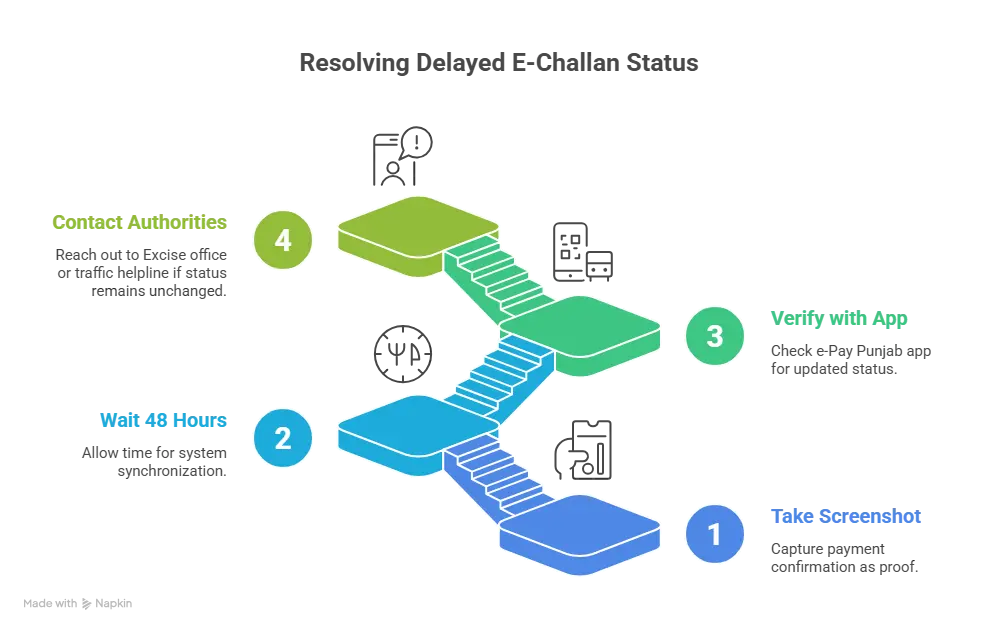
The 4-Step Technical Solution
Screenshot the Bank Deduction
The very first action you must take is capturing the SMS or banking app notification displaying the debited amount against the target PSID. The Transaction Authority Number (TID) acts as an impenetrable shield against vehicle blacklisting.
Initiate a 48-Hour Wait Period
Do absolutely nothing for 48 hours. The banking reconciliation engines typically scan for “ghost payments” every midnight. It is highly probable your status will change automatically to “Paid” once the automated backlog clears overnight.
Verify Manually via e-Pay Punjab App
Instead of relying on the web-based e-challan website, launch the official “e-Pay Punjab” mobile application. Head into the ‘Traffic Police’ tab and insert your PSID. Because the app connects directly to the finance ledger, it usually updates faster than general public portals.
Lodge an Escalated Complaint
If 72 hours pass with no status change, do not repay the amount. Physically visit your local Excise branch with the printed digital TID receipt, or instantly dial the public traffic helpline to force an administrative manual override of your payment ledger.
FAQ Crucial Expert Answers
Q. Will my vehicle get blocked if the portal still displays active?
Absolutely not. Provided you possess the valid Transaction ID (TID) from your bank or wallet application, you are legally and structurally protected against any arbitrary impoundment. Your cash was routed correctly.
Final Verdict (Conclusion)
Experiencing a delayed “Active” status after a legitimate payment is highly prevalent. In over 99% of scenarios, the underlying synchronization lag resolves natively within a span of 48 hours without any manual human intervention required. Maintain possession of your printed digital receipt at all times, never submit a duplicate payment out of anxiety, and reach out to the authorities exclusively if four whole business days elapse without an update.