
Why is a Paid E-Challan Still Showing Active? The Easy Solution
چالان ادا کرنے کے بعد بھی کیوں نظر آ رہا ہے؟ آسان تکنیکی حل
You used your central banking application, successfully entered your 17-digit PSID (Payment Slip ID), and completed the financial transfer. You even received a digital receipt confirming the deduction. Yet, when you refresh the official Excise or Punjab Safe City Authority (PSCA) portal, the horrifying red letters spelling “Unpaid” or “Active” are still staring back at you. This phenomenon triggers immense anxiety for thousands of citizens daily, leading them to blindly pay the identical fine twice in absolute panic. Understanding the fundamental architecture of governmental payment gateways is your first line of defense.
آپ نے بینک ایپ سے فیس ادا کر دی اور رسید بھی مل گئی، لیکن ویب سائٹ پر چالان ابھی تک “ان پیڈ (Unpaid)” کیوں نظر آ رہا ہے؟ یہ تکنیکی تاخیر شہریوں کو بہت پریشان کرتی ہے اور اکثر لوگ ڈر کر دوبارہ فیس بھر دیتے ہیں۔ آئیے اس کی اصل وجہ اور آسان حل سمجھتے ہیں۔
3 Core Reasons for Status Delays
1. Manual Batch Synchronization
Unlike modern private apps that update globally in real-time, the 1Link banking gateway forwards government receipts to the PSCA servers in pre-scheduled automated batches (typically every 24 hours at midnight).
2. Weekend and Holiday Lags
If you pay your e-challan on a Friday evening, the inter-branch server reconciliation might not physically execute until the following Monday morning, leaving your status “Pending” throughout the weekend.
3. Third-Party Gateway Interruptions
Applications like EasyPaisa or JazzCash sometimes physically deduct your money but fail to return the required “API success ping” back to the government portal due to temporary mobile network dropouts during peak usage.
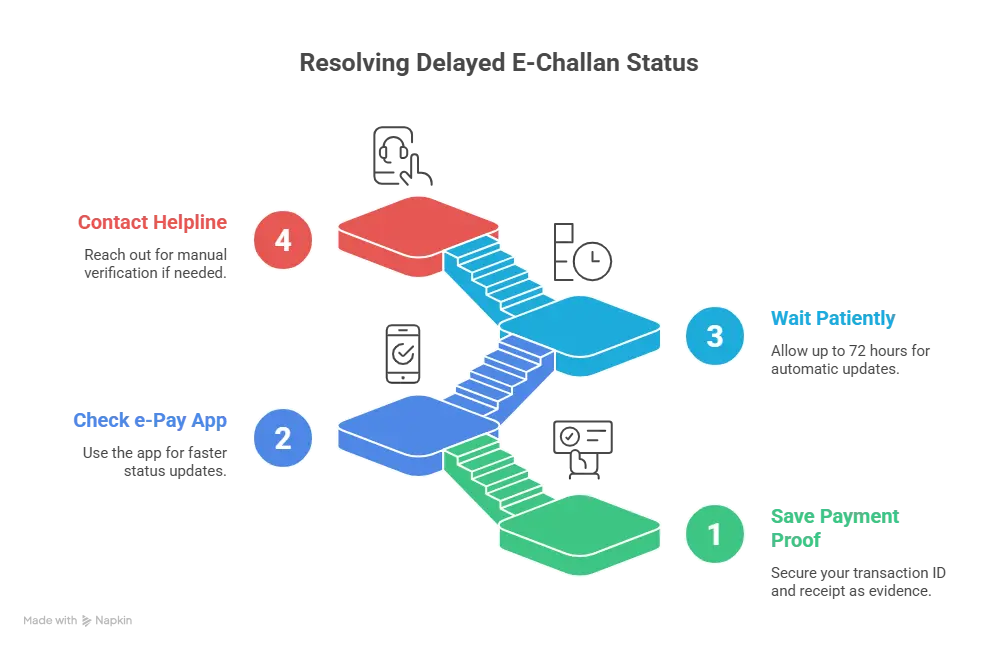
✅ The Easy 3-Step Verification Solution
1. Halt All Further Payments Immediately
If you possess a generated TID (Transaction ID) or a verified SMS from your respective bank, you are legally entirely clear. Do not ever attempt to pay that exact PSID again. Doing so overrides the system and causes an unrecoverable double-deduction.
2. Check the Mobile “e-Pay Punjab” Ledger
Do not rely heavily on the public browser website. Download and launch the official e-Pay Punjab Android/iOS application. Under the Excise tab, locate Traffic Police and input your PSID. The mobile application interfaces directly with the master financial ledger and updates significantly faster than public portals.
3. The 72-Hour Rule & Escalation
Implement absolute patience for exactly 72 hours. If three entire business days completely elapse and your standing remains stubbornly “Active,” it indicates a stalled API call. Physically dial the 1152 helpline directly, provide your TID receipt number, and demand an immediate manual administrative override.
Frequently Asked Queries
Q. Will traffic wardens arrest me if the portal says unpaid?
No. Any digital or printed PDF screenshot demonstrating your bank successfully executed the payment utilizing the exact PSID acts as an impenetrable temporary defense against physical impoundment on the streets.
Final Summary (حتمی نتیجہ)
Witnessing a delayed status is a standard, highly common byproduct of backend governmental banking procedures. Do not succumb to unnecessary fear. Safeguard your payment screenshot vigorously, deploy immense patience during the subsequent 72 hours, and merely leverage official phone lines if absolute intervention becomes unavoidable.