How to Fix E-Challan Website Errors: Simple Troubleshooting Guide
ای چالان ویب سائٹ کے تکنیکی مسائل اور ان کا فوری حل
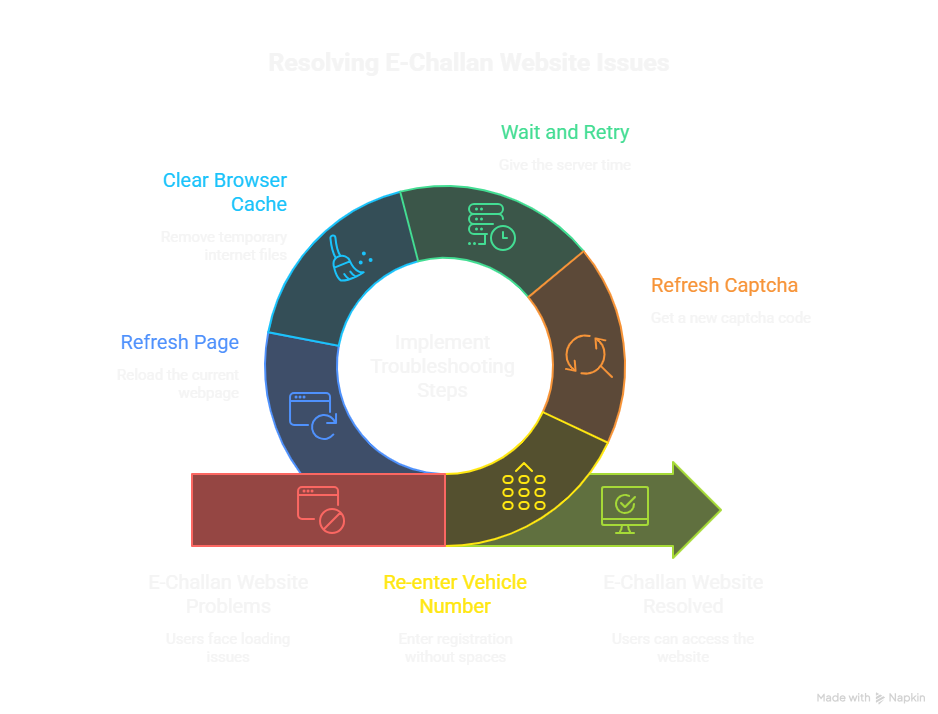
Checking your traffic fines online should be a quick process, but encountering an e-challan website error can be highly frustrating. Whether the official Punjab Police portal is down or it is showing a “Record Not Found” message, these glitches mostly stem from server downtime or simple entry mistakes. This troubleshooting guide is built to help you quickly identify the root cause to fix these issues.
اہم نوٹ: ای چالان چیک کرنے کے دوران اگر آپ کو ویب سائٹ لوڈ ہونے میں پریشانی ہے، تو اس گائیڈ کی مدد سے آپ گھر بیٹھے خود ہی ان ایررز (Errors) کو سمجھ کر باآسانی ٹھیک کر سکتے ہیں۔
Most Common E-Challan Errors & How to Fix Them
(عام شکایات اور ان کا حل)
Different error codes mean different problems. Before you assume the portal is entirely offline, review our structured breakdown of the most frequently searched e-challan issues below:
| Website Error Code | Main Reason | Quick Fix |
|---|---|---|
| Record Not Found | Incorrect vehicle details or CNIC format. | Re-enter Registration Number without spaces (e.g., LEB181234). |
| 503 / Server Unavailable | High database traffic or scheduled maintenance. | Wait 30 minutes, clear browser cache, and refresh the page. |
| Invalid Captcha | Captcha expired or typed incorrectly. | Click the refresh icon on the captcha image and try again. |
Network & Payment Troubleshooting
(انٹرنیٹ اور پیمنٹ کے مسائل)
Sometimes your own browser settings might block the government’s official checking portal. In other cases, network interruptions can affect your payment via JazzCash or EasyPaisa.
| Troubleshooting Action | Details (تفصیل) |
|---|---|
| Clear Browser Cache | Delete old website data in Chrome to load the fresh portal. |
| Disable Active VPN | Pakistani official domains often block international VPN IPs. |
| Payment Gateway Delay | If PSID fails, use alternate banking apps (e.g., HBL, JazzCash). |
Pro Tip: Attempting to verify fines multiple times during a complete server blackout won’t help. Save your vehicle number and always check early morning (between 7 AM to 9 AM) for optimal website speed.
اپنا ای چالان چیک کرنے کے لیے ہماری ہوم پیج پر موجود ٹول کا استعمال کریں تاکہ آپ کو کسی پیچیدہ ایرر کا سامنا نہ کرنا پڑے۔
Frequently Asked Questions (FAQs)
1. How do I fix the E-Challan website showing a 503 Service Error?
(503 ایرر ویب سائٹ پر کیوں آتا ہے اور اسے کیسے ٹھیک کریں؟)
A 503 error means that the Punjab Police backend servers are temporarily down due to maintenance or excessive user load. The best troubleshooting step is simply waiting 30-45 minutes before refreshing.
2. Why does the portal say “Record Not Found” for my vehicle?
(میرا چالان چیک کرتے وقت ریکارڈ ناٹ فاؤنڈ کیوں آ رہا ہے؟)
To resolve the “Record Not Found” issue, ensure your vehicle registration and CNIC have no extra spaces or hyphens. Type exactly as written on your official Excise Smart Card.
3. Can my VPN block the E-Challan payment portal?
(کیا VPN استعمال کرنے سے ای چالان کی ویب سائٹ کام کرنا چھوڑ دیتی ہے؟)
Yes, Pakistani government portals often strictly secure their servers by blocking anonymous and international VPN access. Always turn off your VPN while checking your fines.